
Test the 2.4.4 beta
Run the newest MilkNHoney build on your phone with the free Expo Go app — no APK needed. Camera scanning works here, unlike the browser demo.
- Install Expo Go from Google Play.
- Open Expo Go and tap Scan QR code, then scan this code:
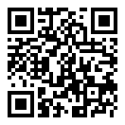
On the phone already? Open in Expo Go
Or in Expo Go choose Enter URL manually and type exps://dev.milknhoneyapp.com
The first load takes a minute (the app downloads its ingredient database). After that it opens quickly.
This is a test build: things may change or break. If it won't load, the test server may be updating — try again in a few minutes.
Found a problem? Email [email protected] with what you scanned and what happened.